UniApp Example


Project Setup
For installation, configuration, and first-time setup, see the UniApp Tutorial.
Overview
This example demonstrates how to integrate ApiSorcery with UniApp projects. UniApp is a cross-platform framework that allows you to write once and deploy to multiple platforms including iOS, Android, Web, and various mini-programs.
Features
- Cross-platform compatibility: Works seamlessly across all UniApp supported platforms
- TypeScript support: Full TypeScript integration for better development experience
- Auto-generated API clients: Generate type-safe API clients from Swagger/OpenAPI specifications
- Request/Response interceptors: Built-in support for request and response handling
- Error handling: Comprehensive error handling with proper error types
Demo Functionality
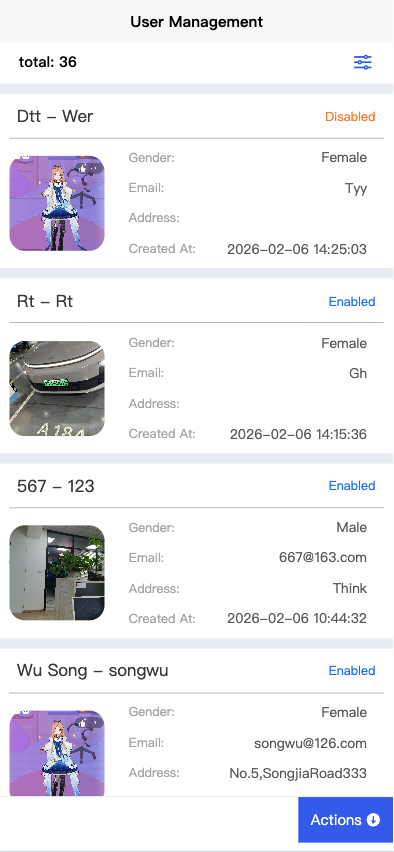
This demo app implements a complete User Management module backed by a live API:
- Paginated list — query users with filtering by code, name, and status
- Full CRUD — create, view, edit, and delete user records
- Avatar upload — upload images via
POST /file/upload, with 10 MB size validation - Excel export — download filtered results as
.xlsxvia the Blob response - Field validation — async uniqueness check for the
codefield before form submission
Code Examples
Paginated List
typescript
import * as ApiUser from '@/apis/auto/demo/ApiUser';
import type { UserInfoDto } from '@/apis/auto/demo/model';

export default {
  data() {
    return { users: [] as UserInfoDto[], total: 0, page: 1 };
  },
  async onLoad() {
    const res = await ApiUser.getUserPaged({
      pagination: { page: this.page, limit: 10 },
      code: '',
      name: '',
    });
    this.users = res.results || [];
    this.total = res.total || 0;
  },
};
Excel Export
typescript
import * as ApiUser from '@/apis/auto/demo/ApiUser';

async function exportUsers(code = '', name = '') {
  const res = await ApiUser.exportUsers({ code, name });
  // uni.saveFile or trigger download depending on platform
  uni.showToast({ title: 'Export complete', icon: 'success' });
}
Avatar Upload
typescript
import * as ApiFile from '@/apis/auto/demo/ApiFile';

async function uploadAvatar(): Promise<string> {
  return new Promise((resolve, reject) => {
    uni.chooseImage({
      count: 1,
      success: async ({ tempFilePaths }) => {
        const fileId = await ApiFile.uploadFile({ file: tempFilePaths[0] });
        resolve(`${BASE_URL}/file/${fileId}`);
      },
      fail: reject,
    });
  });
}
Platform-specific Considerations
Mini-programs
When targeting mini-programs (WeChat, Alipay, etc.), ensure your API endpoints are added to the whitelist in the respective platform's configuration.
H5/Web
For H5 deployment, configure CORS properly on your backend server to allow cross-origin requests.
App (iOS/Android)
Native app builds work out of the box with no additional configuration needed.
Best Practices
- Environment Configuration: Use different API endpoints for development, staging, and production
- Error Handling: Implement global error handling for consistent user experience
- Loading States: Show loading indicators during API calls
- Caching: Implement appropriate caching strategies for better performance
- Type Safety: Leverage TypeScript for better code quality and developer experience