Service Configuration
Quick Start
The simplest service configuration requires only three basic parameters:
{
  "code": "product",
  "source": "https://www.apisorcery.com/demo-api/swagger-json",
  "version": 3
}
These three parameters are all you need to get started with ApiSorcery!
Parameter Description
Basic Parameters (Required)
The following three parameters are the minimum set for configuring a service and the most important ones:
code
- Type: string
- Required
The service code, defined by the user.
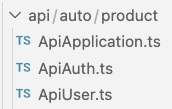
Note: When generating APIs, directories will be created based on the application's output directory and the service code. All API files for the service will be placed in this directory. For example, if the application's output directory is ./src/api/auto and the service code is product, the final generation directory will be ./src/api/auto/product
source
- Type: string
- Supports online files, e.g.,
https://***/swagger.json - Supports local files (relative path), e.g.,
./**/swagger.json
The Swagger address, supporting both local files and online files.
version
- Type: number
- Optional values:
2|3
The Swagger version, currently supporting Swagger/OpenAPI 2.x/3.x.
Advanced Parameters (Optional)
The following parameters are for more fine-grained control and customization. Configure them based on your actual needs:
enabled
- Type: boolean
- Default: true
- Optional values:
true|false
Whether the current service is enabled. When disabled, the current service will be excluded when generating APIs. Other services under the current application are not affected.
returnLevel
- Type: string
- Default: 'second'
- Optional values:
'second'|'first'
The structural level of the generated API response message. Since interfaces typically return the following structure during processing:
{
  "status" : 0,
  "message" : "OK",
  "data" : {
    xxx:xxx
  }
}
The first-level structure is often handled uniformly through interface interceptors (such as error prompts), so only the second-level structure needs to be processed. Therefore, this parameter defaults to second.
returnSecondField
- Type: string
- Only valid when
returnLevelissecond
The specified field when generating the second-level structure of the API response message.
Since user-returned results are not uniform, this field needs to be specified.
Example When the interface returns the following structure:
{
  "status" : 0,
  "message" : "OK",
  "data" : {
    xxx:xxx
  }
}
At this time, returnSecondField can be specified as data
baseStrategy
- Type: string
- Default: 'always'
- Optional values:
'once'|'always'
The strategy for generating the base file.
- 'once': Generate only when the file does not exist; if it already exists, keep it and do not overwrite (default).
- 'always': Overwrite on every generation.
httpClientStrategy
- Type: string
- Default: 'always'
- Optional values:
'once'|'always'|'none'
The strategy for generating the base file.
- 'once': Generate only when the file does not exist; if it already exists, keep it and do not overwrite (default).
- 'always': Overwrite on every generation.
- 'none': Do not generate
tagNameMap
- Type: object
Mapping table from Swagger tag names to the class name prefix used in generated code.
Why this matters: Each Swagger tag becomes a class in the generated API client. The class name is derived from the tag name, so it must follow identifier naming rules — only ASCII letters, digits, and underscores are valid. Non-ASCII characters (Chinese, Japanese, Arabic, etc.) will produce class names that cannot be compiled.
Tag Naming Rule
Tag names containing non-ASCII characters must be mapped via tagNameMap. If a mapping is not provided, ApiSorcery will attempt to infer a class name from the API paths under that tag. If inference succeeds, a warning is printed and generation continues. If inference fails, the original tag name is used as-is — the generated code will contain invalid identifiers and will not compile.
Example:
{
  "tagNameMap": {
    "用户认证": "Auth",
    "应用管理": "Application"
  }
}
The generated API documentation is as follows: